Leads - what they are, and how a status moves on its own
Last updated: November 16, 2026
Leads - what they are, and how a status moves on its own
You add somebody to Dreamteam after a conference, email them, and they write back. A week later a meeting goes in the diary. Nobody updates a field at any point, and yet the record keeps up with you. That is lead status doing its job, and this page explains what it is reading.
A lead is just a contact
Dreamteam has no separate lead record, and there is nothing to convert. What tells a lead apart from the rest of your contacts is a single field on the contact: Contact Activity Status.
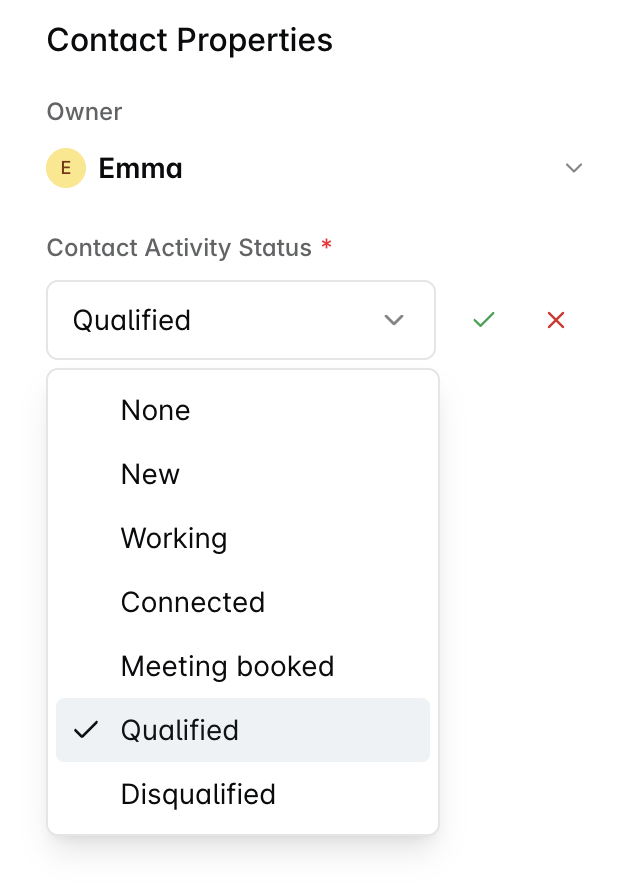
It has seven values, and the first one means "not a lead". That is where every new contact starts.
Status | What it means |
|---|---|
None | Not a lead, and the default. Somebody the CRM knows because you crossed paths: people you exchange email with, vendors, colleagues, import rows nobody has confirmed. Nothing moves a contact off None on its own. |
New | A lead, and nobody has reached out to them yet. |
Working | You have made that first touch. An email has gone out to them. |
Connected | They came back to you. A reply, or a thread of their own. |
Meeting booked | A meeting with them is in the diary, whoever booked it. |
Qualified | The end of the road for the lead. They became, or joined, a deal, and the work moves to the deal. |
Disqualified | The other end of the road. Ruled out, with a reason recorded. |
Four ways a contact becomes a lead
Somebody fills in one of your lead capture forms.
You import a file and mark its rows as leads.
You set the status yourself, from None to New.
A past lead comes back. Promoting a Qualified or Disqualified contact again starts a fresh run rather than picking up the old one.
What moves the status for you
Four things move Contact Activity Status on their own. It reads the shape of the activity rather than anything written in it, so no wording in an email moves a status.
What happens | Where the status goes |
|---|---|
You email the lead, with them in To or CC | New becomes Working |
The lead emails you back | Working becomes Connected |
A meeting with them goes in the diary, at a time still to come | Meeting booked, skipping any stages in between |
A deal is created or updated with them on it | Qualified |
The order runs New, Working, Connected, Meeting booked, and it only ever moves forward through them. Some things never move it at all: adding a note, adding a task, or editing a field on the record. Nor does time passing on its own.
You can set the status by hand whenever you like, and a status you set by hand is kept. The next automatic move carries on from where you left it rather than overwriting you.
Finding your leads
Open Contacts and switch to the All leads view.
All leads is the only lead view Dreamteam sets up for you, and the name is literal. It holds every lead in the workspace, not only the ones you own.
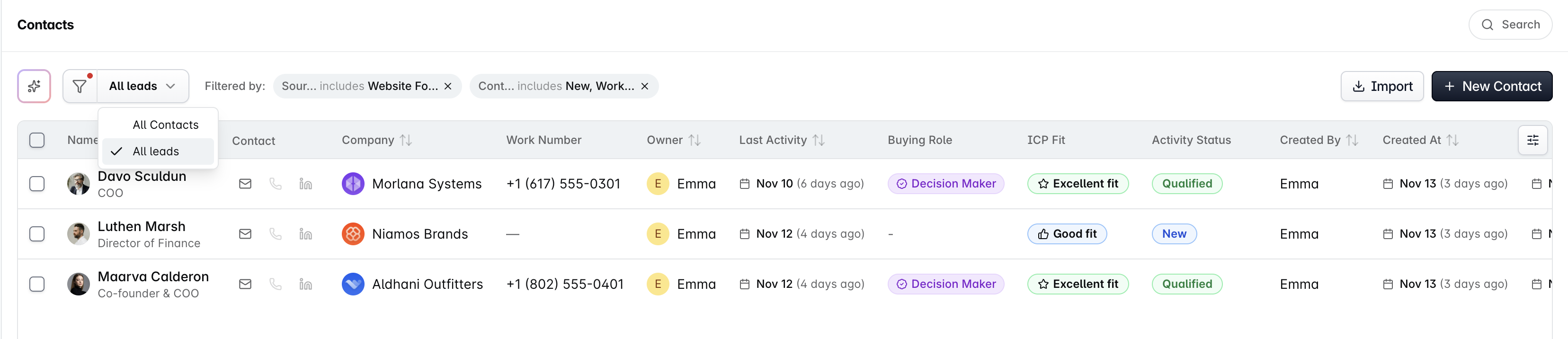
It is worth knowing what that view holds: leads that arrived through a website form or an import, and whose status is still open, meaning New, Working, Connected or Meeting booked. A lead you promoted by hand, or one that has reached Qualified or Disqualified, is still a lead but will not appear there. To see those, filter the full Contacts list on Contact Activity Status instead.
Making a view of just your own leads
There is no ready-made view of only your leads. You build it once, in under a minute, and it stays on your view list afterwards.
Open Contacts and switch to All leads.
Add a filter: Owner includes your own name.
Click Save As and give the view a name, for example My leads.

A view you save is yours alone. Nobody else sees it, and saving one does not change All leads for anybody.
Frequently Asked Questions
Why has my lead's status not moved?
Almost always because none of the four things above has actually happened yet. These are the reasons it most often looks stuck.
The contact is not a lead yet. A contact sits in your contact book until something makes it a lead, and a contact book entry is left out of this altogether. Set its status to New and it starts moving from there.
Their reply came before anything went out. A reply only moves a lead to Connected once you have sent them something first.
The meeting has already happened. Only a meeting still to come moves a lead to Meeting booked, so a meeting logged after the event does not.
The activity is older than the lead. Everything is measured from the moment the contact became a lead. An email you sent, or a meeting you booked, before that moment does not count.
The reply was not from a person. An out of office, an automatic acknowledgement or a bulk sender is not treated as a reply.
The lead is already Qualified or Disqualified. Emails and meetings never move a lead out of either one. A deal is the exception: creating or updating a deal with the contact on it sets Qualified whatever the status was.
Somebody emailed us first. Why is their status still New?
An inbound email on its own moves nothing, and that is deliberate.
Connected means the person came back to you, so it needs a first touch from your side to come back from. Until somebody on your team has emailed them, an incoming message leaves the status where it is.
Send them a first email and the status moves to Working. Their reply to that then moves it to Connected. If you would rather not wait for the sequence, set the status by hand on the record and the automation carries on from there.
A contact jumped straight from New to Meeting booked. Is that a bug?
No, and nothing was missed. A meeting can skip stages.
Somebody who books straight off your website goes from New to Meeting booked without ever passing through the stages in between, because the thing that moves the status is a future meeting appearing in the diary, whatever came before it.
My older contacts are all sitting at New and never move.
Contacts that were already at New before lead management arrived in your workspace are not picked up by the automation. The automatic movement anchors itself to each lead at the point the lead starts, so leads that started earlier carry no anchor.
They will not move on their own, and this is not something that can be backfilled.
Those contacts are still perfectly good to work with. Set the Contact Activity Status by hand as the engagement progresses, exactly as you would have done anyway.
Is there a Contacted status, or a step to convert a lead?
The value you are probably after is Working, which is where a lead lands once you have made the first touch.
And there is no conversion step to run, because there is no second record to create. A lead that becomes a deal moves to Qualified, and the work carries on at the deal.
If a lead is behaving in a way this page does not explain, send us the contact at gethelp@dreamteam.ai.