Rachel - your research assistant
Last updated: September 3, 2026
A new lead appears in your CRM and you know nothing about them beyond a name and an email address. Rachel is the assistant that closes that gap before you pick up the phone.
She is your research assistant. When a contact becomes a lead, Rachel goes and finds out who they are and what their company looks like, then hands you a brief.
When Rachel runs
Rachel researches a contact the moment they are promoted to a New lead and the company that get's created along with it. What she finds appears on the Research tab of that contact's record, with the company research on the matching tab of their company.
What the brief contains
Two sections. The first is about the person:
Their name, job title and seniority
Their likely buying role - whether they are the decision-maker, an influencer, or the person who will use what you sell
Career history and education
Where they are based, and where the information came from
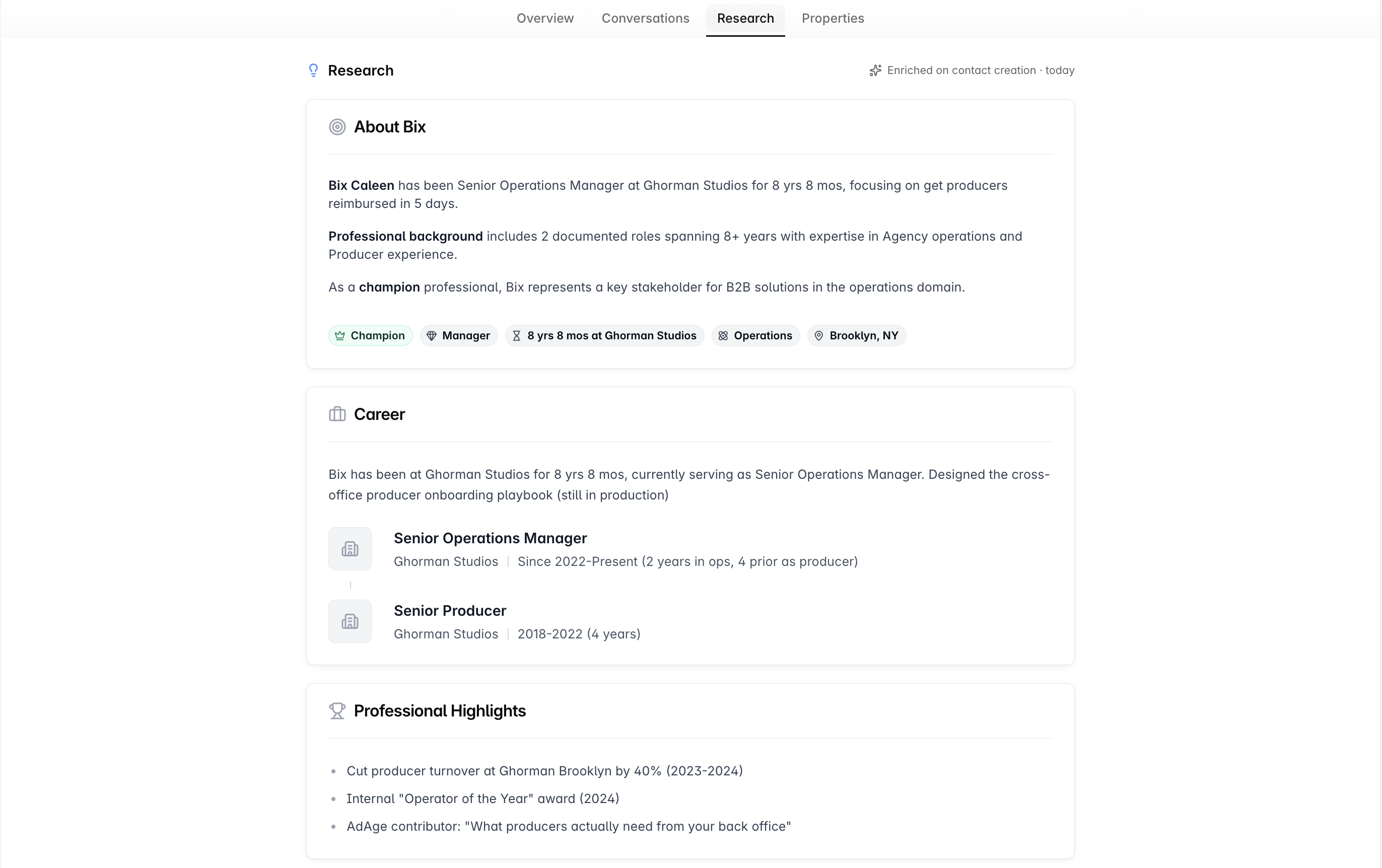
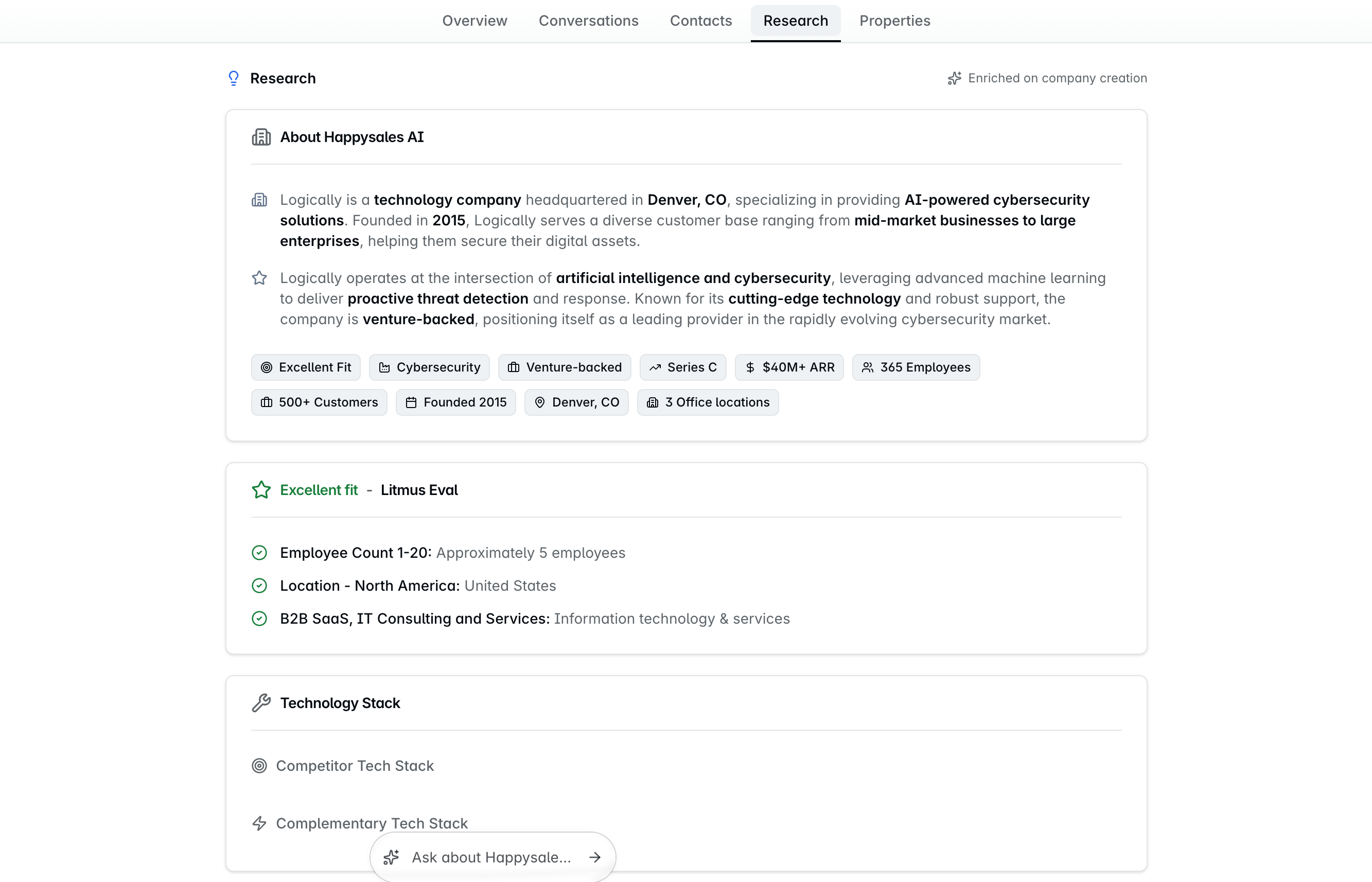
The second is about their company:
Industry, company size, and the year it was founded
Revenue and funding - the latest round and the total raised
The technology they run
How well they fit your ICP, with the reasoning behind that read, and which of your products fit them
Rachel leaves gaps rather than filling them. If she cannot establish something, the brief says nothing found instead of guessing - so what you read is what she could actually verify.
Keeping meeting attendees current
Rachel does a quieter job as well. When Dreamteam builds the brief for an upcoming meeting, it checks how recently each linked contact was researched and refreshes the ones that have gone stale.
What counts as stale: research more than 30 days old. Anyone researched more recently is already current, and is skipped.
How many at a time: at most five of those stale contacts per run. Each refresh is a real research call, so a long invite list is not refreshed all at once. Anyone already current does not need a slot.
It does not hold up the brief. The brief is written from whatever is on the record at the time, then rewritten on its own once the fresh research lands.
Attendees who miss the cut are not dropped. What is already on their record still goes into the brief, and the next five are picked up the next time it is rebuilt.
Both numbers are defaults and can be changed for your workspace.
Contacts who have never been researched at all are handled separately, as part of creating the contact.
Good to know
The brief is a snapshot from the moment the lead was created. It does not update itself - if the company raises a round next month, the brief will not change.
The contact and company records themselves keep being enriched as new activity lands. It is only the brief that is frozen.
Rachel runs by default for every workspace - there is nothing to switch on.
FAQs
Not everyone on my meeting got refreshed.
That is the cap doing its job, but it only ever applies to the stale ones. Contacts whose research is more than 30 days old are the candidates; anyone researched more recently is already current and is skipped rather than queued. At most five of those candidates are refreshed per brief. Nobody is dropped - the rest keep the information already on their record, and the next five are picked up the next time the brief is rebuilt.
Where does Rachel get this from?
Public sources about the person and their company, plus what your own CRM already knows about them. Each contact section names its source so you can judge it.
Half the brief is empty. Is it broken?
No - that is deliberate. Rachel only writes what she can establish, and a small or private company simply leaves less of a public trace. An empty field means nothing found, not nothing there.
Can I ask Rachel to research somebody specific?
Not on demand. She runs when a contact becomes a New lead, which is what triggers the brief.
The ICP fit looks wrong.
ICP fit is judged against the products in your Knowledge Hub. If the read is off, it is usually the product descriptions that need sharpening rather than the lead.
We are not seeing any lead research at all.
Rachel is on by default for every workspace, so there is nothing to switch on. Two things explain most of it. Either there is little publicly available information about that person or their company - in which case the brief will be thin rather than missing - or the research has not finished yet. A large contact import in particular takes a while to work through. If briefs are still not appearing after that, get in touch.
If you need help or assistance, reach out to us at gethelp@dreamteam.co.