Viewers - read-only access, without a paid seat
Last updated: November 15, 2026
Your founder wants to look at the pipeline on a Monday morning. Your finance lead needs to see what actually closed last month. A solutions engineer wants to read the deal before joining the call. None of them is going to work in the CRM, and none of them should cost you a seat.
That is what the Viewer role is for. A viewer can read your workspace and change nothing in it. Viewers are free, and they do not use any of the seats you pay for.
Adding one is no different from adding anybody else: pick Viewer in the Role picker when you invite them, and Inviting Your Sales Team to Dreamteam CRM has those steps. Your workspace has a limit on how many viewers it can hold, and as soon as you choose Viewer a note under the picker tells you what yours is.
What a viewer can see
A viewer sees what an admin sees. This is the part worth reading twice, because it surprises people: Record Visibility does not apply to a viewer. That is the setting that decides who can see whose records. If your workspace is set so that reps only see the records they own, a viewer still sees everybody's, sitting outside it exactly as an admin does.
A viewer can read | Including |
|---|---|
Every record | Contacts, companies, deals and any custom records, whoever owns them, plus the whole pipeline board |
Every conversation | Email threads that have synced in from your team's inboxes, and call recordings, transcripts and meeting summaries |
Notes and files | Everything anybody has written or attached to a record |
Work the AI has already done | A deal's debrief and qualification, meeting summaries, research on a contact, and the roll-ups that total up how the team is doing |
Settings, read-only | The member list, your pipeline and stages, custom fields, Record Visibility and the Knowledge Hub. They can look; they cannot change anything |
Billing is the exception. Settings then Billing does not open for a viewer, so your card, your invoices and what you pay stay private to admins. A Sales Rep, by contrast, cannot open Settings at all.
Think about this before you invite somebody from outside your company. A viewer is not a limited guest account. Anybody you give the role to can read every customer conversation in the workspace, including emails from your colleagues' inboxes and recordings of calls they were not on. There is no way to narrow it down to one team, one pipeline or one set of records.
What a viewer cannot do
These are blocked on our servers, not just hidden on the screen, so there is no way round them.
They cannot | What that means day to day |
|---|---|
Change records | No creating, editing or deleting a contact, company or deal, and no dragging a deal between stages on the board. Notes, files, tasks and meetings go the same way: a viewer reads them and adds none of them. Importing is out too |
Use the AI | Ask Dreamteam and the fullscreen chat page are not available to a viewer, and neither are AI filters. Buttons that do their work by opening the chat, such as New Contact, are not on their screen either |
Connect or send email | No connecting a mailbox or calendar, and no sending email out of Dreamteam. Autopilot is not offered to them |
Change settings | They read Settings but change none of it, integrations and Record Visibility included |
Own a record | Viewers do not appear in owner pickers, so nothing new can be assigned to them |
Three things a viewer can change
Their own password. Changing it and resetting it both work as normal.
Their own API key. They can see it and generate a new one. The key carries their access, so it can read your data and never write to it.
A one-off export. A viewer can filter a list and export it to a spreadsheet. Setting up an export that runs on a schedule is not available to them.
How the CRM looks to a viewer
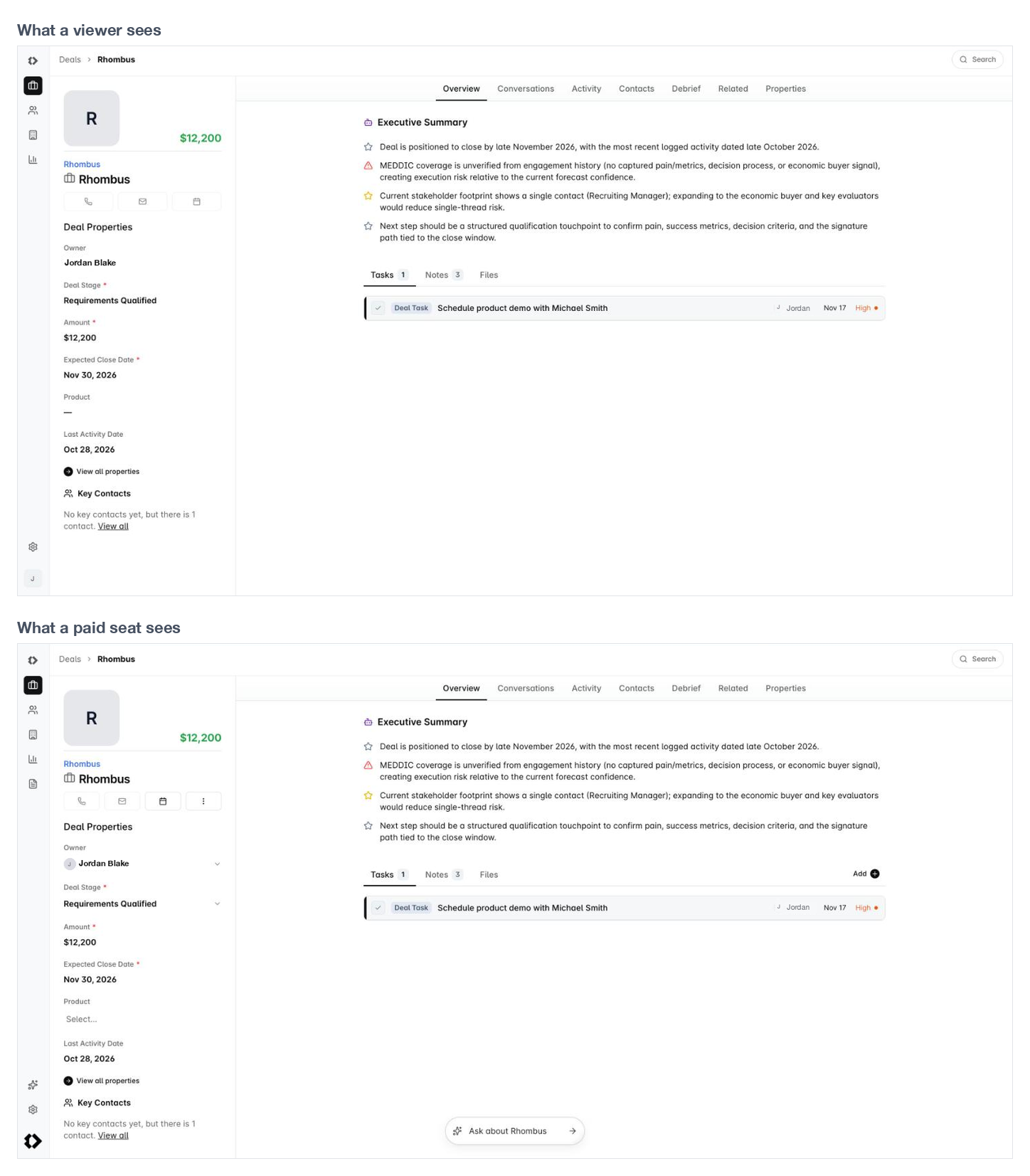
Nothing is tucked away behind a different app. A viewer opens the same Dreamteam everybody else does, with the writing taken out of it.
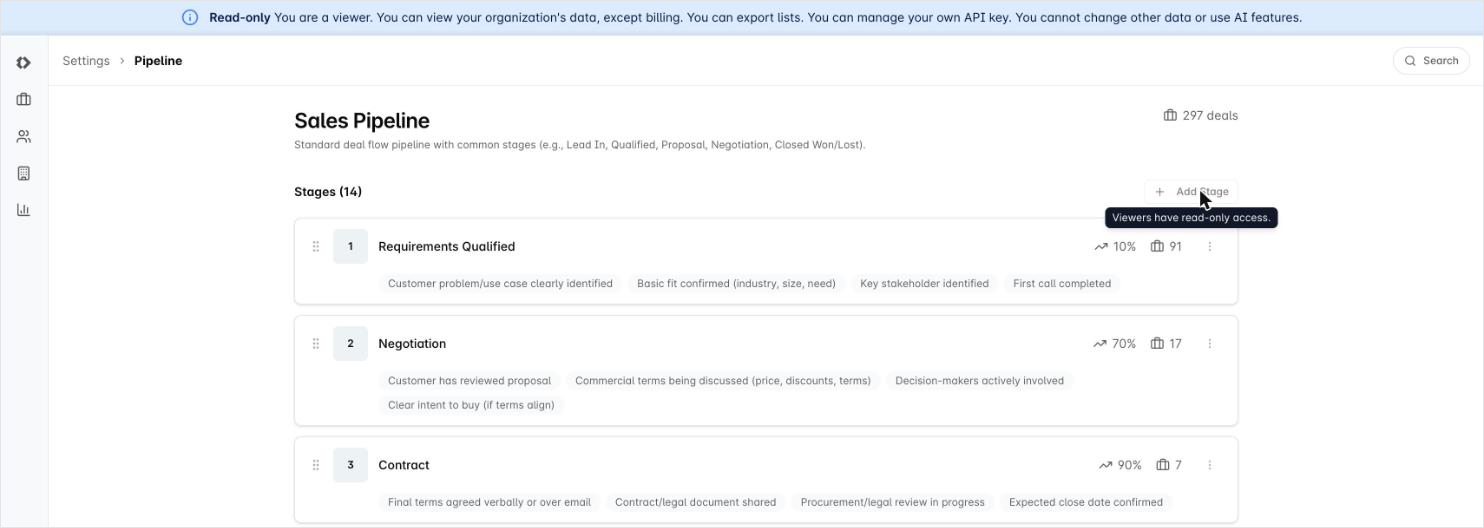
A Read-only banner sits across the top, where other people see the prompts about connecting their inbox. It spells the role out in full, so a new viewer does not have to guess what they are allowed to do.

Most controls are absent rather than disabled. Where one cannot be hidden it is greyed out and reads Viewers have read-only access.
Settings opens, and reads normally. A viewer can see how the workspace is set up without being able to change any of it. Billing is the one page that does not open for them.
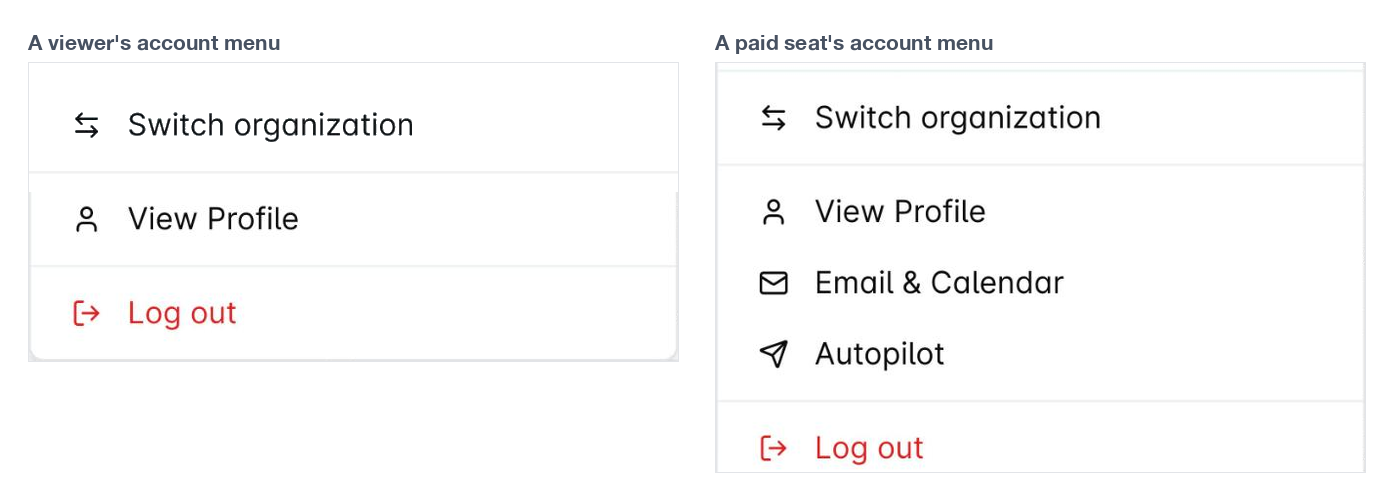
Their sidebar is shorter. The fullscreen chat page is not in it, and their account menu offers their profile only, because there is nothing for them to connect.
Changing somebody to or from Viewer
A role change takes effect straight away. Making somebody a viewer frees the paid seat they were using; moving a viewer back to Sales Rep or Admin takes a seat again. Either way it shows on your next bill, and nothing is charged while you are still on your trial. Billing never blocks a change to your team, so a role change always goes through.
Reassign their deals first. Changing a rep to Viewer does not touch the records they own. Their deals and contacts carry on naming them as the owner, while the owner picker no longer offers them - so you can end up with a deal owned by somebody who is not allowed to work it. Nothing warns you at the time. Move their records to whoever is picking them up, then change the role - easier before than after, because you can still find them by filtering on owner.
FAQs
A viewer needs to leave a note on a record. Can we allow just that?
No. There is no read-only-plus-notes version of the role, and notes cannot be switched on for one person.
If logging what they saw is part of the job - which it usually is for solutions engineers and customer success - then they need a Sales Rep seat rather than a viewer one. The other option is that they send it to a colleague who writes the note.
Can a viewer be put in charge of a team?
No. When you name a team's manager, viewers are not among the people offered, because being a manager is about running a team and a viewer does not act on anything.
Being a manager grants real extra access - the pipeline roll-ups, and Export on a list - and a viewer already reads all of it, so there is nothing a manager badge would add.
Can a viewer save a filter or a list view?
No, and this one catches people out, because filtering itself works perfectly well.
A viewer can change the filters on a list and see the results, and any view that has already been saved still opens for them. What they cannot do is keep their filter: the only button offered is Reset, so Save and Save As are not there.
If a viewer keeps needing the same cut of the data, have somebody with a paid seat save that view. Saved views are personal to whoever made them, so the viewer will still need to set their own filters each time.
Our API returns the role as "collaborator" rather than "viewer". Are they the same thing?
Yes, they are the same role. The screens in Dreamteam call it Viewer and the API still calls it collaborator. Nothing behaves differently; it is only the name.
The role is honoured over the API as well, so a viewer's key can list and read your records, and every attempt to create, update or delete comes back refused as read-only.
If you need help or assistance, reach out to us at gethelp@dreamteam.ai.